Pull & Drop Ops

I've spent many sleepless nights trying to move ModuOps beyond drops-only with a "pick up all." That's our history -- Mad River and Big Timber never tracked condition, and ModuOps hasn't either, until now.
ModuOps is a car-type-based pseudo-random select engine (for the most part), which makes this an interesting design challenge. I wanted a scheduling engine that still handles drops as we know them, but also tracks what's been sent to each drop zone and schedules those cars to be pulled later.
What I came up with is the new "Pull & Drop Ops" scheduling engine -- with a twist...
ModuOps unique features
ModuOps has two features that set it apart. First, it doesn't care what condition the layout is in when an ops session starts -- no need to pre-stage cars at drop zones.
Second: ModuOps started life at model train shows, where operators put on a show and chat with show-goers. Mistakes happen. Someone stops you mid-switching to ask a question, you chat for 10 minutes, and somehow you drop a plastic pellet hopper at a bakery that needed flour... oops!
That's ok -- ModuOps is self-correcting. The next crew is instructed to PICKUP ALL when dropping, and the mistake gets carted away.
A new engine that tracks what types of cars are where on the layout had to preserve both of these.
New scheduler in a nutshell
The Pull & Drop Ops engine schedules car types to drop zones the same way we always have: a train's route generates a list of potential equipment requests, weighted by a "demand" factor, and items are randomly selected onto the train's manifest -- printed as a train list or switchlist like always.
The first time a train visits a drop zone, the crew is instructed to "Pickup All" -- this resets the zone to a known condition. From then on, the app remembers what car types are sitting at each drop zone and how much capacity is left.
When building a manifest, the engine now also checks drop zone condition to decide if a pickup should be scheduled alongside (or instead of) a drop. Sometimes it's a pull with a drop, sometimes a pull only. Sounds a lot more realistic!
How do you fix mistakes though?
Not perfect, but it works. Remember that pellet hopper mistakenly dropped at the bakery? A future crew's manifest will call for a covered hopper -- the correct car for flour. Finding no flour hopper there, the crew will (hopefully) leave the pellet hopper alone and move on.
You can also configure the engine so every so many services of a drop zone, the crew is told to "PICKUP ALL" regardless of what's there -- guaranteed correction. This is a configurable number that you can play with to see what works for you.
And now for something completely different...
I've long been obsessed with implementing a car card system using car types in ModuOps. I'm happy to announce that the Pull and Drop Ops engine adds car card functionality to the App. Here is how it works.
First, consignee requests can be marked as a producer or a consumer. Let's say we have a lumber mill that is a producer of lumber -- it needs an empty center beam flat car to load milled lumber. The engine schedules a center beam flat to be delivered from the yard. At some point in the future, the engine schedules a pick up of the now loaded car to return back to the yard.
Meanwhile, a lumber yard selling lumber is a consumer, consumers always request loaded cars from their source yard. The scheduler sees the loaded car sitting in the yard and puts it on a train to the lumber yard. Once unloaded, the now empty car eventually gets pulled back to the yard -- and the cycle repeats.
Sound familiar? It's a basic car card system -- using car types instead of reporting marks, with no cards to manage, and still self-correcting and prep-free like the rest of ModuOps.
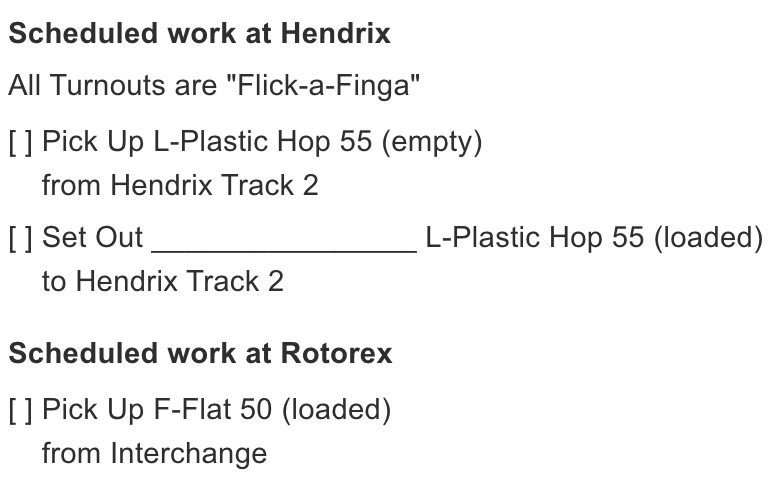
It's working, and fun to watch in motion. You'll now see an indication on train lists and switchlists on whether a car is loaded or empty when you have producers and consumers in the layout. Cool!
Example of Trainlist
Yard to yard transfers
What if a producer and consumer aren't served by the same yard? In real life, cars hop from yard to yard until it reaches one that services the requesting producer or consumer. The Pull & Drop Ops engine handles this too -- routing a car through any number of yards to reach the one that needs it. More on this in a future post.
More overhead = more prototypical
The Pull and Drop Ops engine adds overhead to an ops session for sure -- since the scheduler tracks drop zone condition, train lists and switchlists are now numbered and need to be run in sequence and can not be skipped or the apps status of where cars are on the layout will be off.
When can I get my hands on this?
This is new ground, and a little weird at first if you've done traditional car card ops before -- but it's an interesting idea, and I hope you give it a try. The work on this engine is on going but has reached a state where I am comfortable adding the new engine to the app at this point.
The Pull & Drop Ops engine is coming as part of the completely rewritten ModuOps. Developer preview releases are coming soon -- stay tuned!